 Sign Up
SceneCraft Story Lesson Integration
Discover how to connect your SceneCraft story to classroom learning with tips, examples, and planning tools.
Integration into your lesson
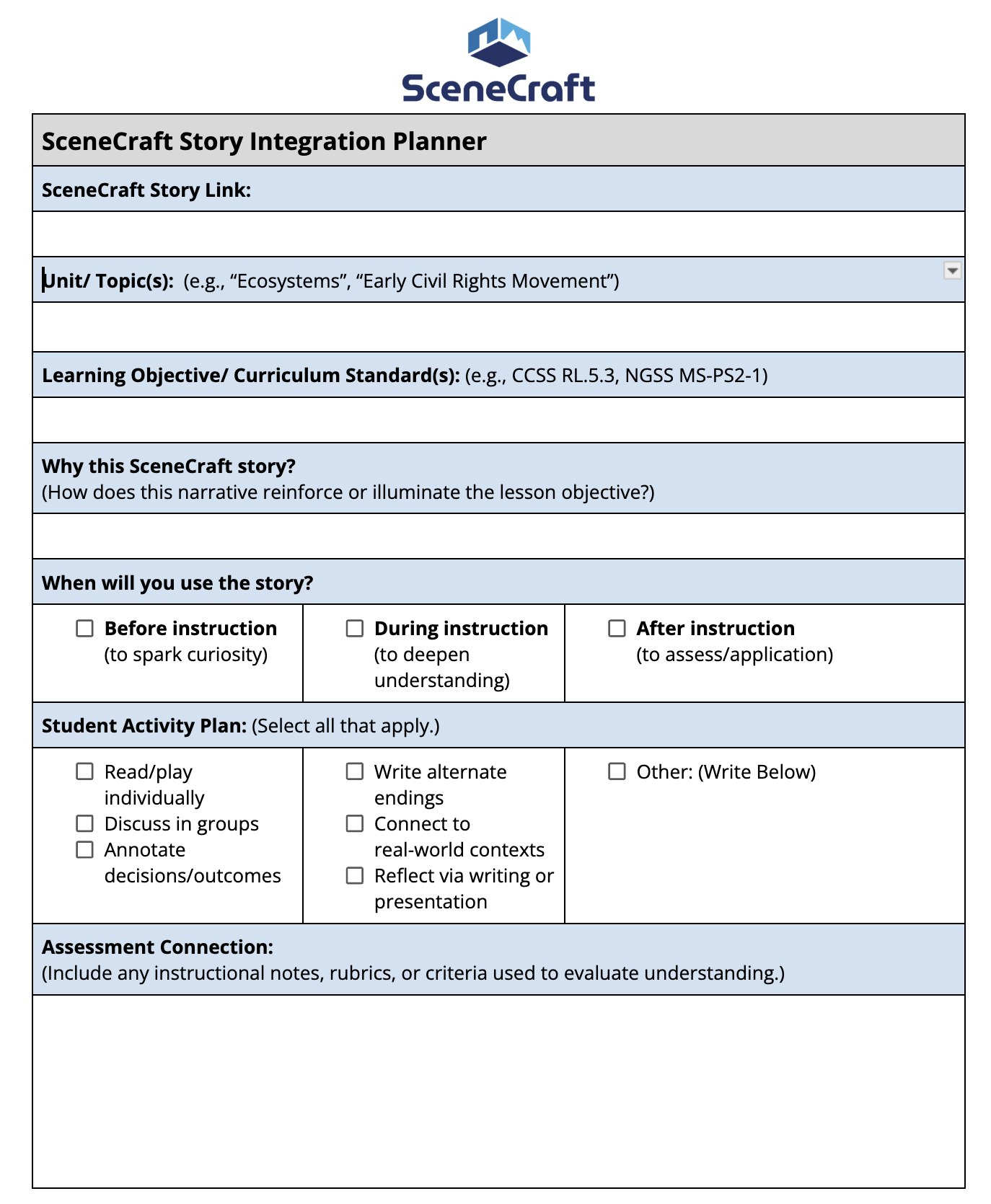
Identify the Big Picture
Unit/Topic(s)
Write the title of the unit or concept the story connects to.
Examples: “Ecosystems,” “Civil Rights Movement,” “AI & Ethics”
Reconnect to Standards
Learning Objective/ Curriculum Standard(s)
List the academic standard or learning goal this story supports.
Examples: “NGSS MS-LS2-1” or “Analyze how characters evolve (CCSS RL.5.3)”
Explain the Story’s Purpose
Why this SceneCraft Story?
Describe how the story helps students understand, apply, or connect with the learning goal.
Tip: Think of the story as a hook, lens, or application opportunity.
Examples: “This story gives students a human perspective on ecosystem changes by placing them in the role of a junior park ranger.”
Decide When to Use It
Choose one or more options depending on your goal:
Before instruction: To build curiosity or activate prior knowledge
During instruction: To deepen the exploration of a concept
After instruction: To apply knowledge or assess understanding
Choose Student Activities
Student Activity Plan
Select all the ways students will engage with the story.
These can be reading-focused, interactive, reflective, or creative.Read/play individually
Discuss in groups
Annotate decisions or outcomes
Write alternate endings
Connect to real-world contexts
Reflect via writing or presentation
Other (custom activity)
Tip: Combine modes for richer learning, like discussion + reflection.
Measuring Understanding
Assessment Connection
Explain how you’ll assess what students learned from the story.
This could include:A rubric-aligned writing task
A group presentation
A science diagram
A math explanation of data
A creative extension project
Tip: Be clear on what evidence of learning you’re looking for and how you’ll evaluate it.
SceneCraft Teacher Resources
Access teacher guides and other resources to help use SceneCraft in your classroom
Creating Your SceneCraft Prompt
Discover how to craft clear and creative prompts that effectively guide the AI and align with your lesson objectives.
Navigating the Authoring Tool
Get familiar with the SceneCraft interface and learn how to build, edit, and customize your story scenes with ease.
SceneCraft Story Lesson Integration
Discover how to connect your SceneCraft story to classroom learning with tips, examples, and planning tools.